Turn a long web address into a short one, like qtap.cc/summer.
Create your short link
- Click Short links in the left menu, then + Short link.
- Paste your address in Long URL, and type the ending you want in Short URL (or leave it empty for a random one).
- Click Shorten URL. Done. Your link is ready to copy.
Pick an ending people can read and say out loud: qtap.cc/summer-sale works better than qtap.cc/x7Kp2.
After you create it
Your link's page opens, showing Your link is qtap.cc/summer.
- Click the copy button to copy your link, or the chart button to see how many people clicked.
- To send people somewhere else, change Destination URL and click Update.
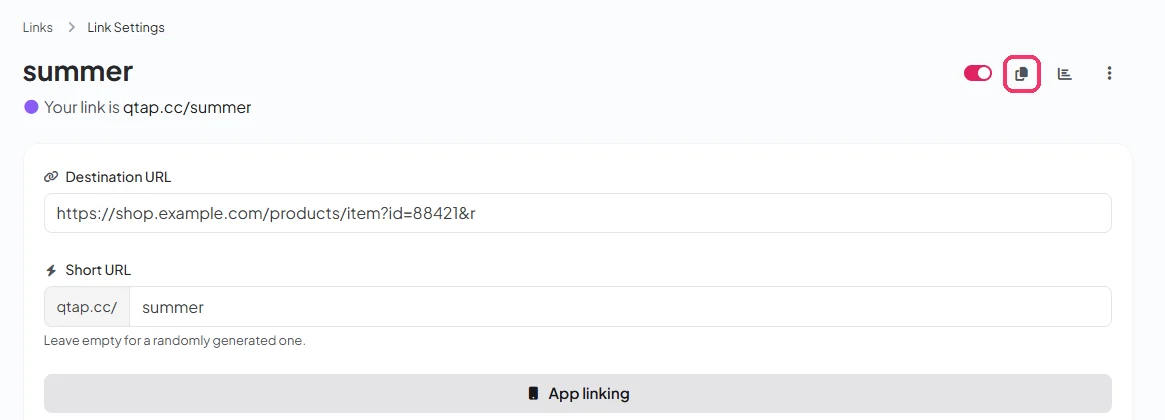
Already printed or shared your link? Don't change its ending (the word after qtap.cc/). The old link stops working. Change the Destination URL instead.
More you can do with your link
Your link's page has more options. You don't need any of them to get started, but they're there when you want them:
ProjectsGroup your links so you find them fast later.
Schedule and click limitStart or end a link on a date, or after a number of clicks.
PasswordOnly people with the password get through.
TargetingSend visitors to different pages by country, device or language.
App linkingOn phones, open links to apps like YouTube or Instagram in the app.
Pixels and UTM tagsTrack visits in your ads and analytics tools.
Email reportsGet a monthly summary of your clicks by email.
CloakingKeep qtap.cc/summer in the address bar while showing the page behind it.
Some options depend on your plan.